



MySQL Storage Engine Architecture
Connection Threshold Simulation | Load Testing | Connection Management | Storage Engines
MySQL is widely used in production environments, but real-world performance depends heavily on how well you handle connections, simulate load, and choose the right storage engine. In this blog, we’ll break down four critical areas every DBA and developer should understand.
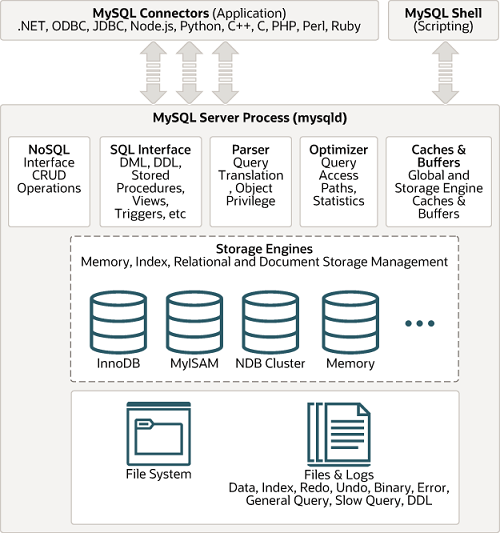
1. MySQL Connection Threshold Simulation
What is it?
Connection threshold simulation is the process of testing how many concurrent connections your MySQL server can handle before performance degrades or fails.
Why it matters
- Prevents unexpected crashes in production
- Helps tune
max_connections - Identifies bottlenecks (CPU, RAM, disk I/O)
Key Parameter
SHOW VARIABLES LIKE 'max_connections';
Simulation Approach
You can simulate high connections using tools or scripts:
Example using bash loop:
mysql -u root -p -e “SELECT 1” &
done
What to Monitor
- CPU usage
- Memory consumption
- Threads running:
SHOW STATUS LIKE 'Threads_connected';
Common Issues
- “Too many connections” error
- Server slowdown
- Connection timeouts
2. MySQL Load Testing Utility
What is Load Testing?
Load testing checks how MySQL performs under heavy query traffic.
Popular Tools
- mysqlslap (built-in tool)
- Sysbench
- JMeter (for advanced scenarios)
Using mysqlslap
Basic Example:
–concurrency=50 \
–iterations=10 \
–query=“SELECT * FROM employees” \
–create-schema=test
Key Parameters
--concurrency: Number of simultaneous clients--iterations: Number of test runs--query: Query to execute
What You Learn
- Query response time
- Throughput (queries/sec)
- Performance under concurrent load
3. MySQL Connection Management
Why Connection Management is Critical
Improper handling leads to:
- High memory usage
- Connection exhaustion
- Slow application performance
Key Concepts
1. Connection Pooling
Instead of opening new connections repeatedly, reuse existing ones.
Used in:
- Java (HikariCP)
- Node.js (mysql2 pool)
- Python (SQLAlchemy pool)
2. Important Parameters
SHOW VARIABLES LIKE 'wait_timeout';
SHOW VARIABLES LIKE 'interactive_timeout';
wait_timeout: Time before idle connections closemax_connections: Maximum allowed connections
3. Kill Idle Connections
SHOW PROCESSLIST;
KILL <process_id>;
4. Best Practices
- Use connection pooling
- Set proper timeout values
- Monitor active connections
- Avoid long-running queries
4. MySQL Storage Engines
What is a Storage Engine?
A storage engine determines how data is stored, indexed, and managed internally in MySQL.
1. InnoDB (Default Engine)
Features:
- ACID compliance
- Row-level locking
- Foreign key support
- Crash recovery
Best for:
- Transactional applications
- Banking systems
- High concurrency systems
2. MyISAM
Features:
- Table-level locking
- Faster reads
- No transactions
Best for:
- Read-heavy workloads
- Data warehousing (non-critical)
3. MEMORY Engine
Features:
- Stores data in RAM
- Extremely fast
- Data lost on restart
Best for:
- Temporary tables
- Caching
4. CSV Engine
Features:
- Stores data in CSV format
- Easy integration with external tools
Use Case:
- Data exchange
Check Storage Engine
SHOW TABLE STATUS WHERE Name='your_table';
Change Storage Engine
ALTER TABLE your_table ENGINE=InnoDB;
Final Thoughts
To build a high-performance MySQL system:
- Simulate real-world connection loads
- Use load testing tools like
mysqlslap - Optimize connection management with pooling
- Choose the right storage engine (InnoDB in most cases)
Mastering these four areas ensures your MySQL database remains scalable, reliable, and production-ready.
