




Managed Identity and Azure Key Vault
Managed Identity and Azure Key Vault – Secure Secrets Management in Azure
In today’s cloud-first world, security is no longer optional. Applications interact with databases, storage accounts, APIs, and third-party services, all of which require credentials. The traditional way of storing secrets (like usernames, passwords, API keys, and certificates) in configuration files or environment variables is risky and hard to manage.
This is where Managed Identity and Azure Key Vault become powerful security pillars in Azure.
Together, they provide:
-
Password-less authentication
-
Centralized secrets management
-
Strong access control
-
Reduced risk of credential leakage
Let’s understand both concepts in detail and how they work together.
What is Azure Managed Identity?
Managed Identity is an Azure feature that allows your application to authenticate to Azure services without storing credentials in your code.
Azure automatically:
-
Creates an identity in Microsoft Entra ID (formerly Azure AD)
-
Manages the credentials
-
Rotates them
-
Secures them
Your application simply requests a token and uses it to access Azure resources.
Types of Managed Identity
-
System-Assigned Managed Identity
-
Enabled directly on an Azure resource (VM, App Service, Function App, etc.)
-
Lifecycle tied to the resource
-
When resource is deleted, identity is deleted
-
-
User-Assigned Managed Identity
-
Created as a standalone Azure resource
-
Can be assigned to multiple services
-
Lifecycle independent of resources
-
Useful for shared access patterns
-
What is Azure Key Vault?
Azure Key Vault is a cloud service that securely stores and manages:
-
Secrets (passwords, connection strings, API keys)
-
Keys (encryption keys)
-
Certificates (SSL/TLS)
It provides:
-
Centralized secret storage
-
Access control using Azure RBAC or Access Policies
-
Audit logging
-
Versioning
-
Automatic certificate renewal
-
Integration with many Azure services
Instead of embedding sensitive data in code, applications fetch them securely from Key Vault.
Why Combine Managed Identity with Azure Key Vault?
Traditionally, to access Key Vault, applications need:
-
A client ID
-
A client secret
-
Certificate
But where do you store these credentials securely?
That becomes another security problem.
Managed Identity eliminates this issue by allowing:
-
Applications to authenticate automatically
-
No secrets stored in configuration
-
No credential rotation burden
So the flow becomes:
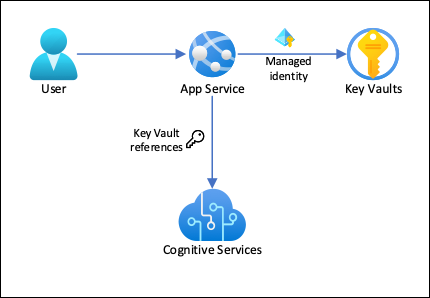
Application → Managed Identity → Azure AD Token → Azure Key Vault → Secrets
No passwords, no secrets in code.
Architecture Flow
-
Application runs on an Azure service (VM, App Service, Function, etc.)
-
Managed Identity is enabled on that service
-
Application requests a token from Azure Instance Metadata Service (IMDS)
-
Azure AD validates identity and returns an access token
-
Application uses token to access Azure Key Vault
-
Key Vault validates token and returns requested secret
This entire process is secure and automated.
Step-by-Step: Using Managed Identity with Azure Key Vault
Step 1: Create Azure Key Vault
Add a secret:
Step 2: Enable Managed Identity on Resource
For App Service:
For Virtual Machine:
Step 3: Grant Key Vault Access
Using RBAC:
Step 4: Access Secret from Application
Example in Python:
No username, no password, no secret in code.
Security Benefits
| Feature | Benefit |
|---|---|
| No hardcoded credentials | Prevents secret leakage |
| Automatic credential rotation | Zero manual effort |
| Least privilege access | Only allowed resources can access |
| Audit logs | Full traceability |
| Centralized secrets | Easier governance |
Real-World Use Cases
-
App Service accessing database credentials
-
Azure Functions calling external APIs securely
-
Virtual Machines accessing encryption keys
-
AKS pods accessing secrets via managed identity
-
CI/CD pipelines fetching secrets dynamically
Managed Identity vs Service Principal
| Feature | Managed Identity | Service Principal |
|---|---|---|
| Credential management | Automatic | Manual |
| Secret storage | Not required | Required |
| Rotation | Automatic | Manual |
| Security | Higher | Medium |
| Complexity | Low | Higher |
Best Practices
-
Prefer Managed Identity over Service Principals
-
Use RBAC instead of access policies
-
Grant least privilege access
-
Separate vaults for Dev, Test, and Prod
-
Enable Key Vault logging and monitoring
-
Avoid exporting secrets into files
Common Mistakes to Avoid
-
Storing secrets in environment variables permanently
-
Giving overly broad permissions to identities
-
Using a single vault for all environments
-
Not monitoring Key Vault access logs
Conclusion
Managed Identity and Azure Key Vault together form the backbone of secure identity and secret management in Azure.
They help you:
-
Remove passwords from code
-
Centralize secret storage
-
Strengthen application security
-
Simplify identity management
-
Follow Zero Trust principles
If you are building cloud-native applications, mastering these two services is not optional—it is essential.
“The most secure secret is the one you never store in your code.”Managed Identity
Want to see how we teach?
Head over to our YouTube channel for insights, tutorials, and tech breakdowns: www.youtube.com/@learnomate
To know more about our courses, offerings, and team:
Visit our official website: www.learnomate.org
Interested in mastering Azure Data Engineering?
Check out our hands-on Azure Data Engineer Training program here:
👉 https://learnomate.org/training/azure-data-engineer-online-training/
Want to explore more tech topics?
Check out our detailed blog posts here: https://learnomate.org/blogs/
And hey, I’d love to stay connected with you personally!
 Let’s connect on LinkedIn: Ankush Thavali
Happy learning!
Ankush😎
