




MySQL Architecture Explained
Introduction: What is MySQL Architecture?
When building high-performance applications, understanding MySQL architecture is the difference between a system that scales and one that crashes during a traffic spike. As a premier RDBMS, MySQL’s modular design allows it to power everything from microservices to massive data warehouses.
But what is the architecture of MySQL? It is a tiered system that separates query processing from data storage. However, this flexibility can be a double-edged sword. If you don’t understand how the layers interact, you’ll likely face “silent” performance killers like lock contention or optimizer failures.
In this mysql architecture explanation, we move beyond the basics to address real-world pitfalls and how to architect for stability.
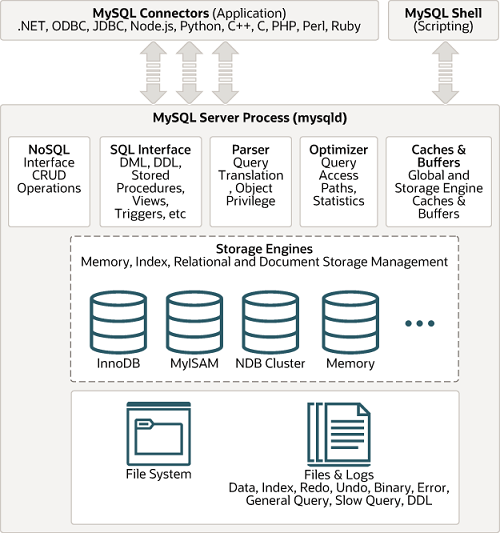
1.The Layered Architecture Overview
| Layer | Name | Purpose |
|---|---|---|
| 1 | Client Layer | Connection handling, authentication, security |
| 2 | Logical (Server) Layer | Query parsing, optimization, caching, built-in functions |
| 3 | Storage Engine Layer | Data storage, indexing, transaction management (pluggable) |
| 4 | Physical Layer | Actual file system (data, logs, system files) |
| 5 | Replication Layer (optional) | Binary log shipping, source-replica synchronization |
2. Layer 1: Client Layer
This is how external applications or users connect to MySQL.
-
Connection Manager: Handles TCP/IP (port 3306), Unix sockets, named pipes.
-
Thread Manager: Each connection gets a dedicated thread (one-thread-per-connection). Avoids process spawning overhead.
-
Authentication: Username, password, host-based validation (mysql.user table). Supports plugins (e.g., LDAP, PAM).
-
SSL/TLS encryption: Encrypts data in transit.
-
Connection Pooling (optional): Via a separate connection pooler (e.g., ProxySQL, or application-level).
Note: MySQL 8.0+ also supports multiplexing (more efficient for short connections) and admin port for privileged access.
3. Layer 2: Logical (Server) Layer
This is MySQL’s brain. It is engine-agnostic.
A. SQL Interface
-
Receives SQL commands (
SELECT,INSERT, etc.) -
Handles stored procedures, triggers, views
-
Outputs result sets
B. Parser (Lexical & Syntax Analysis)
-
Validates SQL syntax
-
Converts SQL into a parse tree (data structure)
C. Preprocessor (Resolver)
-
Checks table/column existence
-
Resolves names (e.g., aliases, wildcards)
-
Checks privileges
D. Optimizer (Critical for Performance)
Steps:
-
Query rewriting (e.g.,
IN→EXISTSif beneficial) -
Cost-based optimization – estimates cost of different plans using table statistics (index cardinality, row count)
-
Join reordering – chooses smallest table first
-
Index selection – chooses between
B-Tree,Hash,Full-text -
Query transformation (e.g.,
INtoJOIN,ORtoUNION)
Output: Execution Plan (EXPLAIN command)
E. Query Cache (Removed in MySQL 8.0)
-
Pre-8.0: Stores result sets for identical SELECT queries. Was useful but caused lock contention.
-
MySQL 8.0+: Completely removed. Use application-level cache (Redis, Memcached) or InnoDB buffer pool.
F. Caches & Buffers (at server layer)
-
Table Definition Cache: Stores .frm (or data dictionary) metadata.
-
Thread Cache: Reuse threads for new connections.
-
Global Privilege Cache: After
FLUSH PRIVILEGES.
G. Execution Engine
-
Executes the plan by calling the storage engine API.
-
Performs sorting, grouping, temporary tables (on disk or in memory).
4. Layer 3: Storage Engine Layer (Pluggable)
This is MySQL’s unique strength. The server layer does not know how data is stored. Each engine implements a standard interface: handler API (e.g., read_row, write_row, index_read).
Most Important Engines
| Engine | Key Features | Best For |
|---|---|---|
| InnoDB (default since 5.5) | ACID transactions, row-level locking, foreign keys, MVCC, crash recovery, clustered indexes | OLTP (high concurrency, writes) |
| MyISAM (historic) | Table-level locking, full-text indexing, compressed tables; no transactions | Read-only / Data warehousing (rare now) |
| Memory (HEAP) | Hash indexes, in-memory tables; no durability | Lookup tables, cache (restart loses data) |
| NDB Cluster | Distributed, shared-nothing, high availability | Telecom, real-time operations |
| Archive | Compressed, only INSERT and SELECT (no update/delete) |
Log storage, audit trails |
| CSV | Stores as CSV file | Data exchange with external systems |
How Engines Work Under the Hood (InnoDB focus)
-
Buffer Pool (InnoDB): Caches both data pages and index pages. One of the most critical memory settings (
innodb_buffer_pool_size). -
Change Buffer: Caches changes to secondary indexes (reduces random I/O).
-
Adaptive Hash Index: InnoDB builds hash indexes automatically on hot pages.
-
Doublewrite Buffer: Prevents torn pages (partial writes) – important for crash safety.
-
Redo Log (ib_logfile*): Writes changes sequentially for crash recovery.
-
Undo Log: Rollback and MVCC (creates old versions of rows).
5. Layer 4: Physical File System
MySQL stores data in files (OS-level). Location defined by datadir.
Key File Types
| File Type | Example | Owner Engine |
|---|---|---|
| Data dictionary | mysql.ibd (MySQL 8.0+) |
Server layer |
| Tablespace | ibdata1 (system tablespace) |
InnoDB |
| Per-table file | employees.ibd |
InnoDB (file-per-table) |
| Redo log | ib_logfile0, ib_logfile1 |
InnoDB |
| Undo tablespace | undo_001, undo_002 |
InnoDB |
| Binary log | binlog.000001 |
Server layer (replication) |
| Error log | error.log |
Server |
| Slow query log | slow.log |
Server |
| Relay log | relay-bin* |
Replica |
InnoDB Tablespace Architecture (simplified)
System tablespace (ibdata1)
├── Doublewrite buffer
├── Change buffer
├── Undo logs (unless separate undo tablespace)
└── Data dictionary (in 8.0, moved to mysql.ibd)

File-per-table (table.ibd)
├── B-Tree data pages
├── Index pages
└── Insert buffer bitmap
Layer 5: Replication Layer (Optional but Important)
Replication is how MySQL scales reads and provides high availability.
Core Components:
| Component | Location | Purpose |
|---|---|---|
| Binary log (binlog) | Source server | Records all data-changing events |
| I/O thread | Replica | Connects to source, downloads binlog events |
| Relay log | Replica | Stores downloaded events before execution |
| SQL thread | Replica | Executes events from relay log |
Replication Architectures:
-
Source-Replica (Async): Default. Low overhead but may lose data on source failure.
-
Semi-sync: At least one replica acknowledges receipt before commit.
-
Group Replication / InnoDB Cluster: Multi-master with built-in consensus.
6. Memory Architecture (Important for Performance)
| Memory Area | Usage | Key Parameter |
|---|---|---|
| InnoDB Buffer Pool | Caches data+index pages – single most important | innodb_buffer_pool_size (50-75% of RAM) |
| InnoDB Log Buffer | Redo log before flushing | innodb_log_buffer_size |
| Query Cache (pre-8.0) | Result cache (removed) | query_cache_size |
| Thread Cache | Reuse connection threads | thread_cache_size |
| Table Open Cache | Metadata for open tables | table_open_cache |
| Sort Buffer | Per-session for ORDER BY/GROUP BY | sort_buffer_size |
| Join Buffer | Block nested-loop joins (no index) | join_buffer_size |
| Temporary Table Memory | Internal temp table before disk | tmp_table_size, max_heap_table_size |
7. Process Flow of a Query (Example: SELECT * FROM orders WHERE id=5)
-
Client → sends SQL over TCP/IP.
-
Connection thread receives it.
-
Parser → checks syntax → parse tree.
-
Resolver → checks
orderstable exists,idcolumn exists. -
Optimizer → sees primary key index on
id→ cost = 1 (direct lookup). Chooses index scan. -
Execution Engine → calls InnoDB’s
index_read()with id=5. -
InnoDB:
-
Checks buffer pool for page containing id=5.
-
If missing, reads from
orders.ibdfile into buffer pool. -
Returns row.
-
-
Execution Engine → formats result set.
-
Server Layer → sends result back to client.
-
Connection thread → waits for next query.
8. Key Diagrams Mentally Visualize
[Client App] → [Connector (Thread)] → [SQL Interface] → [Parser] → [Optimizer]
                                                                   ↓
[Storage Engine API] ← [Execution Engine] ← [Caches] ← [Query Cache (gone)]
         ↓
[InnoDB/MyISAM] → [Buffer Pool] → [OS File System]
For UPDATE/INSERT:
Execution Engine → InnoDB → Write to Log Buffer → Write Redo Log (prepare)
→ Buffer Pool (dirty page) → Commit → Redo Log (commit) →
Background: Purge thread flushes to .ibd → Doublewrite buffer → Data file.
9. Evolution Summary (Versions)
| Feature | MySQL 5.7 | MySQL 8.0+ |
|---|---|---|
| Default storage engine | InnoDB | InnoDB |
| Query cache | Enabled by default | Removed |
| Data dictionary | .frm files | System tables (mysql.ibd, transactional) |
| Atomic DDL | No | Yes |
| Invisible indexes | No | Yes |
| Descending indexes | No | Yes |
| Redo log archiving | No | Yes |
| JSON support | Basic | Enhanced (table functions, multi-valued indexes) |
10. Common Misunderstandings
-
“MySQL is single-threaded” → False. Each connection gets a thread. Internally, InnoDB uses background threads (purge, page cleaner, redo log flush).
-
“MyISAM is faster” → False for modern workloads. InnoDB’s row locking + buffer pool usually outperforms under concurrency.
-
“Increasing buffer pool solves everything” → True only if you properly size it and have enough RAM. Oversizing causes swap.
-
“Statement-based replication is safe” → Non-deterministic functions (
NOW(),UUID()) cause inconsistencies. Row-based is safer (default in 8.0).
11. Further Study Suggestions
To deeply understand MySQL architecture:
-
Read High Performance MySQL (O’Reilly) – covers internals.
-
Commands to explore:
-
SHOW ENGINE INNODB STATUS\G -
EXPLAIN FORMAT=TREE SELECT ... -
SELECT * FROM performance_schema.memory_summary_global_by_event_name;
-
-
Watch for lock waits and deadlocks using
performance_schema.
Final Thoughts
MySQL’s layered architecture is both its strength and its complexity. As a student, understanding these layers gives you a mental framework that applies to almost any database system (PostgreSQL, SQL Server, Oracle all have similar concepts). As a professional, this knowledge transforms you from someone who guesses at performance issues to someone who systematically diagnoses at the correct layer.
Remember: Most performance problems originate in Layer 2 (Optimizer) or Layer 3 (Storage Engine) not the client layer. So when something goes wrong, start there.
One last piece of advice: Always use EXPLAIN before trusting that your query is efficient. The database will humble you, but understanding its architecture will make you its master.
This guide is part of Learnomate Technologies commitment to making database internals accessible to everyone. Follow Learnomate for more deep-dives into MySQL, PostgreSQL, and system design.
